
This article describes Druid indexed tables, an alpha feature introduced in Imply 3.4/Druid 0.19.0-iap.
Like all Imply alpha features, indexed tables are considered experimental and subject to change or removal at any time. Alpha features are provided "as is" and are not subject to Imply's SLAs.
Note: Indexed tables are not currently supported for systems that use realtime ingestion.
Overview
Today, Druid can evaluate JOIN queries internally in two ways:
- By executing subqueries and joining results on the broker, and
- By performing a direct join for data that is available globally, on all query processing nodes, so that processing may be distributed and joins performed locally, which follows a more traditional Druid query path.
Subquery joins are the only type of JOIN that normal Druid datasources can support, are limited with the number of results that can be processed from a subquery, and are much less efficient than direct joins due to their nature.
Before Druid 0.19.0-iap, lookups were the only native table type to support these efficient direct joins, but imposed the limitation of what can be accomplished with a single key and value column. Druid 0.19.0-iap introduces a new type of globally distributed table, the indexed table.
Indexed tables expand what is possible to achieve with efficient direct joins on globally distributed data. Indexed tables are backed by Druid segments, and distributed among the cluster with broadcast load rules. The segments are created with some additional information, which tell Druid how to load the table and which columns are the joinable key columns.
This initial version has some limitations: joins with realtime data are not supported, the entire table must be backed by a datasource with a single broadcast segment, and the entire table must be loaded onto the heap of all query processing servers. Future work is planned for relaxing these restrictions, but even now they should prove to be much more flexible than the existing lookup system.
How to use indexed tables
An overview of the steps to enable and use indexed tables is as follows:
- Enable the indexed-table-loader extension.
- Create an ingestion spec with the indexed table ID enabled. This ingestion spec operates like any, but with the difference that it is broadcast to every node in the cluster.
- Use the table in JOIN queries.
The following sections provide more information.
Enable the extension
The extension can be enabled via Imply Manager using the custom extension dropdown, or for unmanaged installations, by adding indexed-table-loader to druid.extensions.loadList in common.runtime.properties. See Extensions in the Imply documentation for more information.
Configure segment cache on the broker
Without a segment cache location configured on the broker, tables are not marked as joinable. Ensure that the broker has a segment cache by adding the following configuration to the properties file:
druid.segmentCache.locations=[{"path":"/mnt/var/druid/segment-cache","maxSize":5000000000}]
Loading indexed tables
Loading and updating indexed tables is done in nearly the same manner as normal Druid datasources, with indexing tasks. The details are:
- Submit an index task with custom
segmentLoadersection added to thetuningConfigof the ingestion spec:
“tuningConfig”: {
  ...
  “indexSpec”: {
    “segmentLoader”: {
      “type”: “onHeapIndexedTable”,
      “keyColumns”: [“column1”,”column2”,“column3”]
    }
  },
  ...
}
This encodes information into the segment to ensure that Druid is able to load the segment into an indexed table. If this section is left out then the data must be re-ingested, as the segment will not contain the correct information. Be sure to include all columns you want to join against, as queries will be limited to operating on the set specified in this section.
Take care to ensure that the ingestion task only creates a single segment, which will likely involve setting values such as
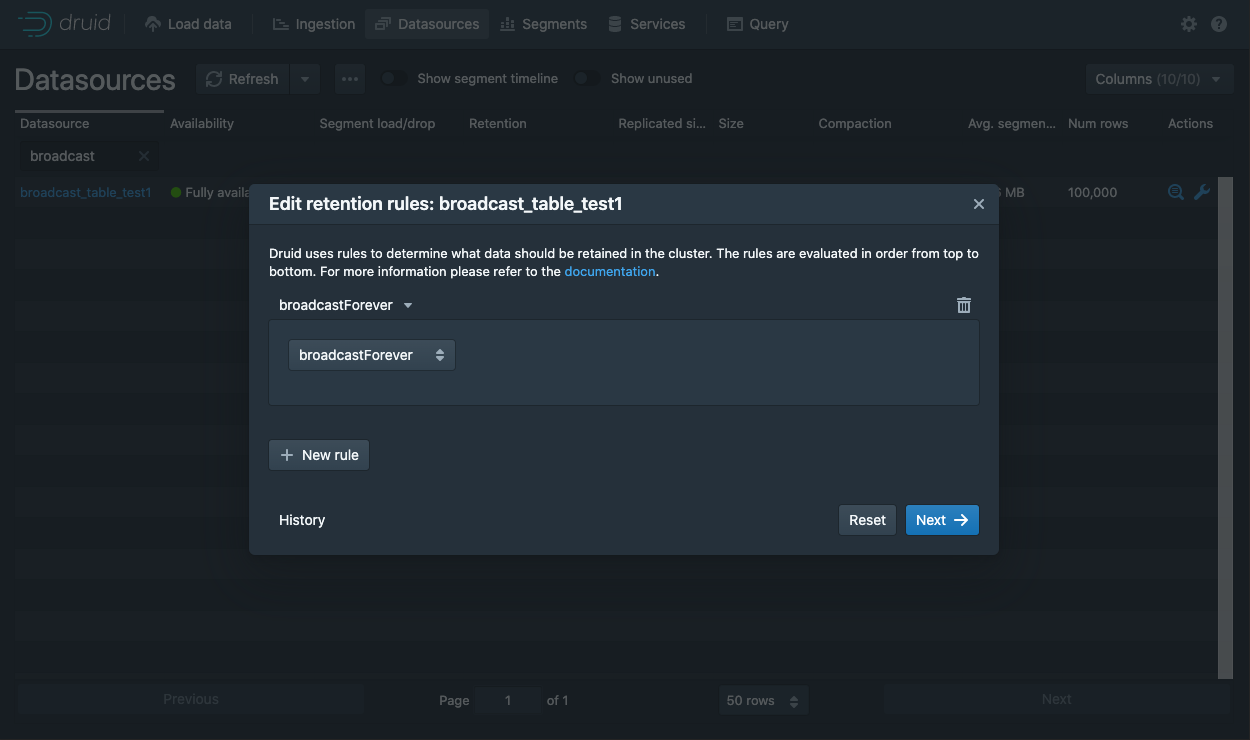
maxRowsPerSegmentandmaxTotalRowsto higher values than normal. Do not worry about trying to achieve typical segment sizing. - Next, set a broadcast load rule for the data source that was just created by editing the retention rules for it:
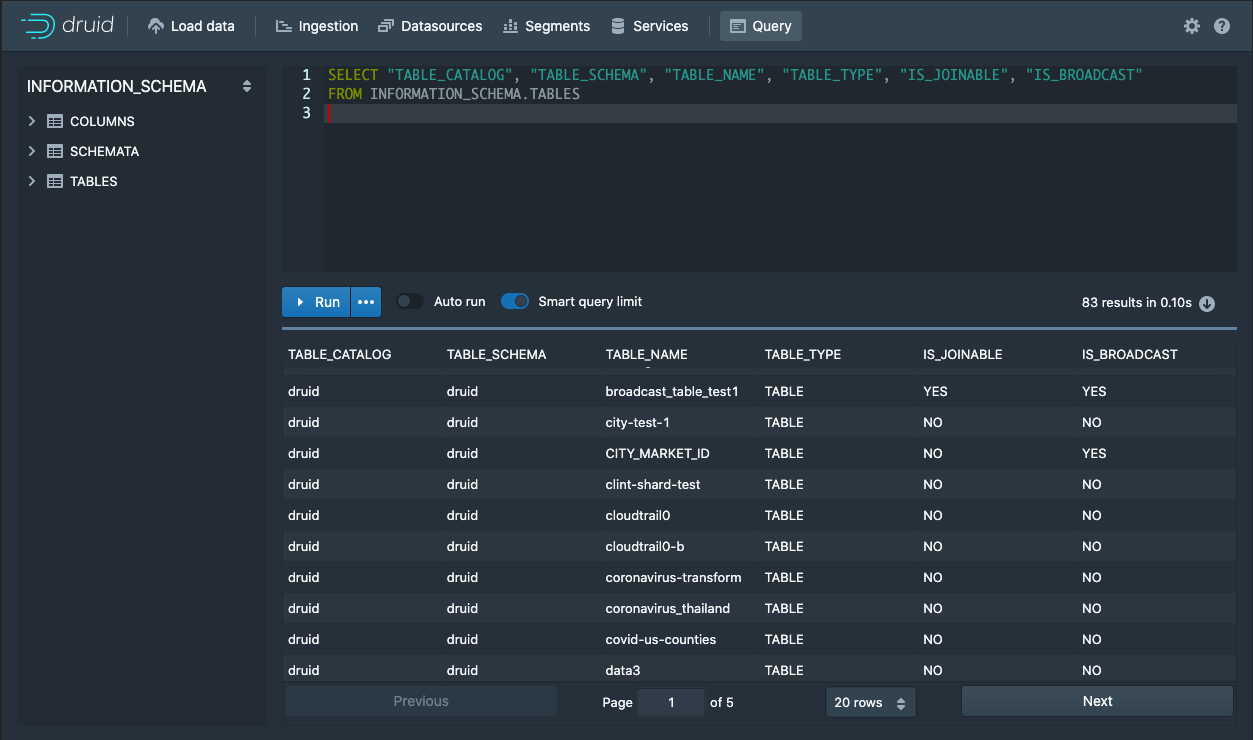
- After changing the retention rule, it takes some amount of time for the change to propagate through the cluster, usually only a Coordinator run cycle or two. Determine whether the information is fully loaded by querying the Information Schema tables as follows.
SELECT “TABLE_CATALOG”, “TABLE_SCHEMA”,”TABLE_NAME”, “TABLE_TYPE”, “IS_JOINABLE”, “IS_BROADCAST”
FROM INFORMATION_SCHEMA.TABLES
Two columns introduced in version 0.19.0-iap, IS_BROADCAST and IS_JOINABLE, should show YES for the newly loaded table, indicating it's ready:
- Try running a join query against the new indexed table, such as the following sample query:
SELECT
  broadcast_join_table.string1,
  sum(regular_table.long1)
FROM regular_table inner join broadcast_join_table on regular_table.stringSequential = broadcast_join_table.stringSequential
GROUP BY 1 ORDER BY 2 - Check that the results show data from the indexed table, broadcast_join_table, and the summed value from the regular table.
Updating indexed table
Since Indexed tables are backed by Druid segments, they can be updated by simply running a new ingestion task, and ensuring that the segmentLoader section is added to the tuningConfig.
Note that since only one segment may back an indexed table at this time, appends are not supported.
Dropping indexed tables
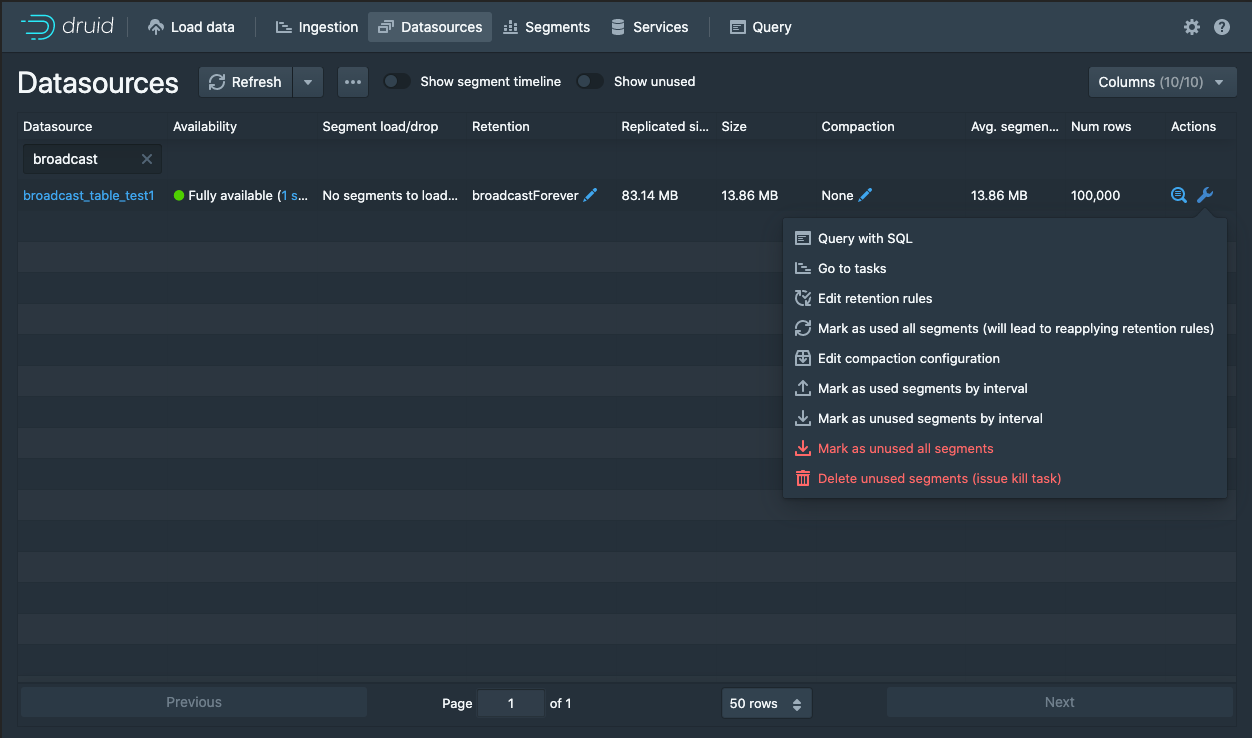
Indexed tables are dropped in the same way as normal Druid datasources, the easiest of which for this broadcast datasource would be by marking the datasource segment as unused:
Querying indexed tables
To make the most of indexed tables, they should be used on the right-hand side of a JOIN query, as follows:
SELECT
 regular_table.string1,
 broadcast_table.string1,
 SUM(broadcast_table.long1),
 SUM(regular_table.long1)
FROM druid.regular_table
INNER JOIN druid.broadcast_table ON regular_table.string1 = broadcast_table.string1
GROUP BY 1, 2
ORDER BY 3 DESC
When structured in this manner, the join operation can be pushed out to all query processing nodes and distribute the work across the cluster, done locally to each segment that is joining to the indexed table.
Indexed tables can be thought of as normal Druid segments with some extra information that allows a hash table to be constructed to enable more efficient joins on the key columns. Because under this veneer there still exists the normal Druid segment, these datasources can also be queried like normal Druid datasources.
When queried directly:
SELECT
 broadcast_table.string1,
 SUM(broadcast_table.long1)
FROM druid.broadcast_table
GROUP BY 1
ORDER BY 2
The query will be pushed down to and processed on a random historical, and the underlying indexed table segment will be processed directly.
Indexed tables may also appear on the left hand side of a join, but in this scenario will be treated the same as a normal Druid segment.
SELECT
 regular_table.string1,
 broadcast_table.string1,
 SUM(broadcast_table.long1),
 SUM(regular_table.long1)
FROM druid.broadcast_table
INNER JOIN druid.regular_table ON broadcast_table.string1 = regular_table.string1
GROUP BY 1, 2
ORDER BY 3 DESC
Here, subqueries will be required to process the results of regular_table, and then process the results of broadcast_table, finally performing the join on the broker.
If joining an indexed table to another indexed table, the left hand query will be pushed down to an arbitrary historical and the right hand side joined against it, no subquery necessary.
SELECT
 broadcast_table.string1,
 broadcast_table2.string1,
 SUM(broadcast_table.long1)
FROM druid.broadcast_table
INNER JOIN druid.broadcast_table2 ON broadcast_table.string1 = broadcast_table2.string1
GROUP BY 1, 2
ORDER BY 3 DESC
Indexed tables can also be joined with lookups, and behave the same as joining a regular table to a right hand side indexed table, or two indexed tables.
SELECT
 lookup_table.v,
 broadcast_table.string1,
 SUM(broadcast_table.long1)
FROM druid.broadcast_table
INNER JOIN lookup.lookup_table ON broadcast_table.string1 = lookup_table.k
GROUP BY 1, 2
ORDER BY 3 DESC
Finally, joining a lookup and indexed table with the lookup on the left hand side, will result in the query being processed entirely local to the broker:
SELECT
 lookup_table.v,
 broadcast_table.string1,
 SUM(broadcast_table.long1)
FROM lookup.lookup_table
INNER JOIN druid.broadcast_table ON lookup_table.k = broadcast_table.string1
GROUP BY 1, 2
ORDER BY 3 DESC
Known Issues
- Coordinators spammed with errors "Failed to broadcast segment" - This is known to happen when there are realtime ingestion jobs. Indexed tables are not yet supported for clusters that have realtime ingestions.
- Information schema shows IS_BROADCAST is YES but not IS_JOINABLE is NO - This can happen for a few reasons:
- The datasource has not yet had time to broadcast the segments. Wait for a few minutes and the schema should update `IS_JOINABLE` to `YES`
- The datasource that you are trying to broadcast contains more than 1 segment. To fix this re-index the datasource so that only 1 segment is generated.
- There are realtime ingestions jobs. Indexed tables are not currently supported in this case.